
Belcoda changelog
New WhatsApp builder
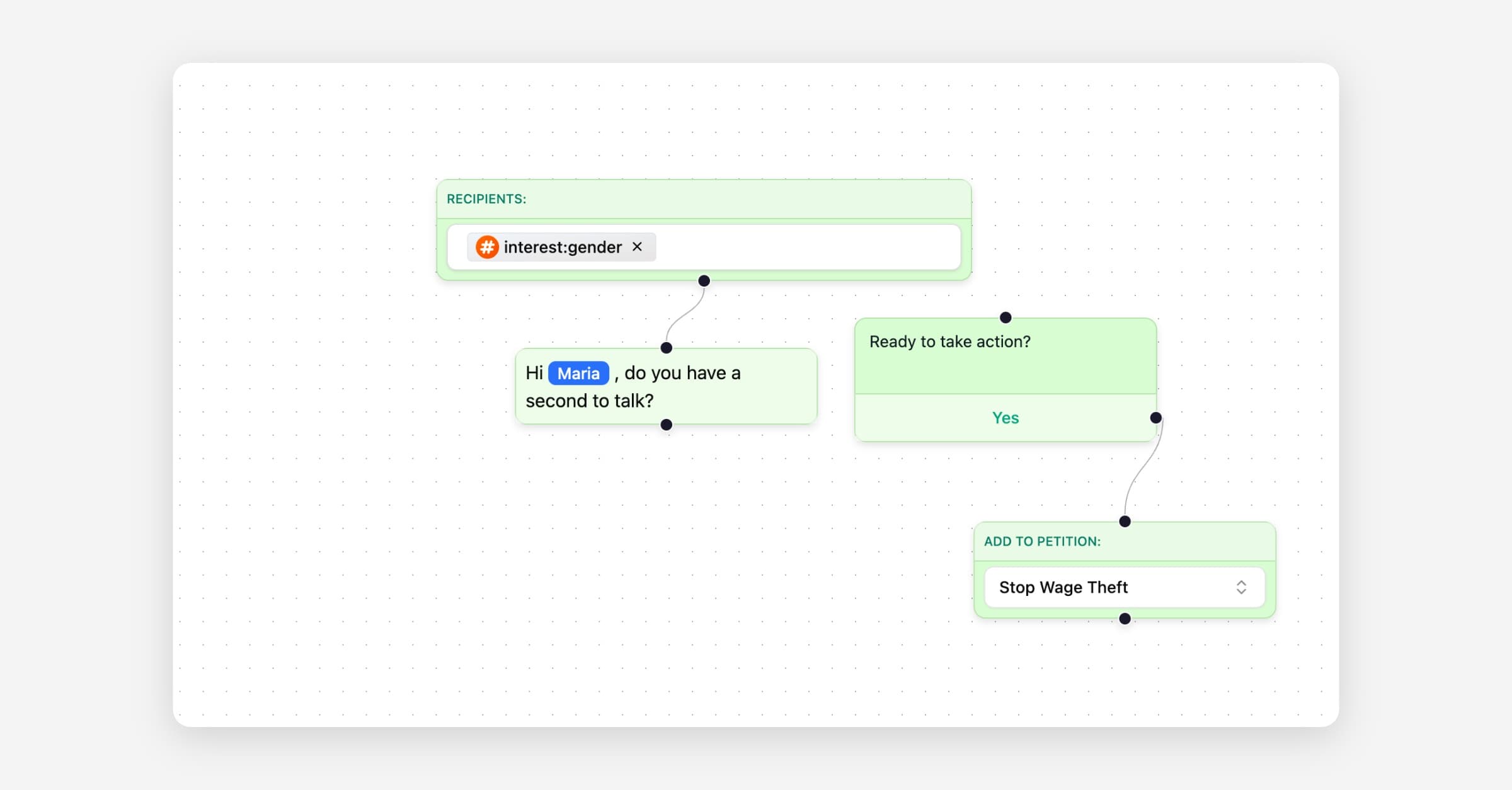
Node-based WhatsApp thread creator
You can build WhatsApp conversations with a node-based canvas. Drag and connect messages, buttons, quick replies, conditions, tags, and actions like “Add to team” or “Sign petition” to shape a guided thread. Preview each step, simulate different paths, and reuse saved nodes for common patterns. This gives you a faster way to design structured outreach, improve response quality, and keep complex flows easy to reason about.
Go to Messaging → WhatsApp → Threads to create or edit a thread. Use the side panel to insert nodes, define variables, and attach approved templates where required. Version your flows, test with sample contacts, and publish when ready. Available today on all plans.
Send test communications
You can send test emails and WhatsApp messages before broadcasting to your full audience. Use a single click to preview subject lines, templates, variables, and link tracking with a small set of recipients you choose. This reduces mistakes, protects deliverability, and gives you confidence that personalization and media render as expected. It fits directly into the existing composer so you keep your flow, and you can standardize who receives tests across your team.
Open the email or WhatsApp composer and select Send test to try your message with real data. Set default test recipients and preferences in Settings → Messaging → Test sends so you don’t retype addresses each time. Available today on all plans.